
Download ClrMamePro – ROM management, Mame emulator, arcade games, classic games, emulator tool
Overview
ClrMamePro is a specialized utility designed for users of Mame, a widely recognized PC emulator dedicated to preserving and running classic arcade and console games. The app addresses a common pain point in retro gaming: the frequent need to update and reconfigure ROM files after Mame releases new versions. These updates often alter file structures, naming conventions, or metadata, requiring manual intervention to maintain game compatibility. ClrMamePro automates this process, dynamically identifying and modifying affected files to ensure seamless operation across emulator versions. This functionality is particularly valuable for enthusiasts managing large collections of ROMs across multiple systems.
Target users include retro gaming aficionados, emulator enthusiasts, and digital archivists who rely on Mame for preserving vintage gaming experiences. The app streamlines the maintenance workflow, reducing the technical burden and allowing users to focus on gameplay rather than file management. While the developer is listed as ClrMamePro, no additional background information is available. The tool integrates into the broader ecosystem of emulation software by enhancing the usability and longevity of ROM libraries. Its role in preserving digital gaming history underscores its importance for the retro gaming community.
Key Features & Functionality
- Automated File Adaptation: ClrMamePro automatically detects changes in ROM files following Mame updates. It locates outdated or incompatible files and applies necessary modifications, eliminating the need for manual file-by-file corrections.
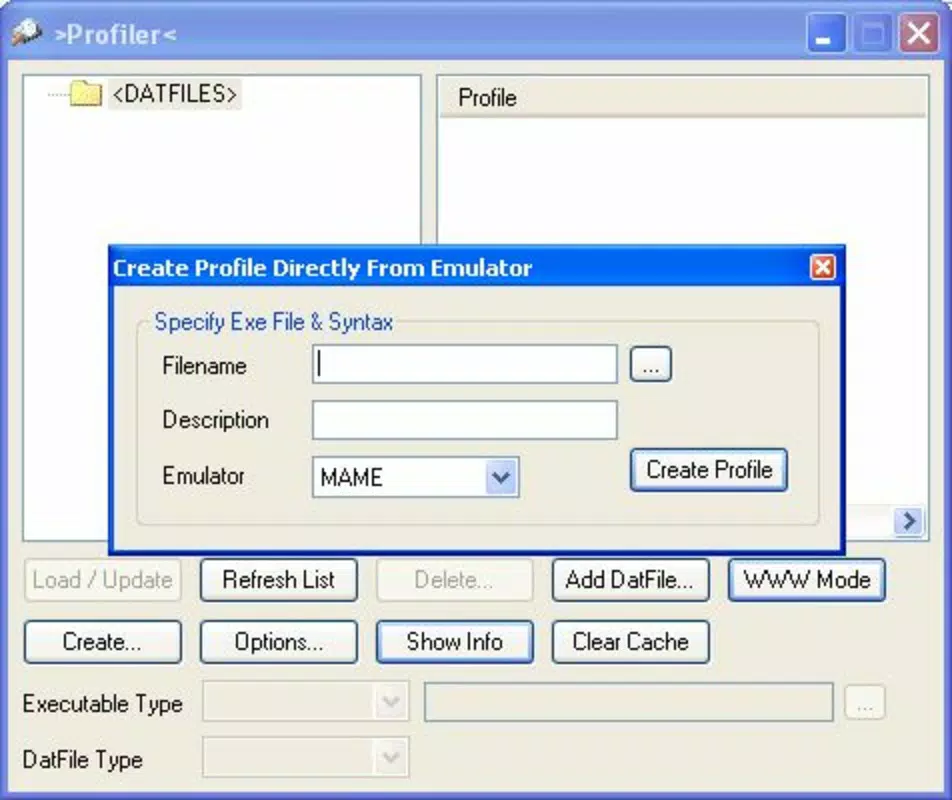
- Data File Creation: Users can generate data files using KlrMamePro, a companion component, to define which ROMs require updates. By entering a file name and description, the system intelligently identifies corresponding old files for processing.
- User-Friendly Interface: The app features an intuitive layout designed to support users of varying technical skill levels. Navigation is straightforward, enabling efficient access to core functions without requiring deep knowledge of emulation systems.
- Multi-ROM Support: ClrMamePro supports a wide variety of ROM formats, making it compatible with numerous arcade and console emulators. This versatility ensures broad applicability across diverse gaming libraries.
- Regular Updates: The development team maintains consistent release cycles to ensure compatibility with the latest Mame versions and to improve overall performance. This ongoing support enhances the tool’s reliability and relevance.
For example, when a user upgrades Mame from version 0.240 to 0.245, ClrMamePro can scan the ROM directory, identify affected files, and apply necessary adjustments automatically. This saves hours of manual work and reduces the risk of errors during file modification. The ability to create custom data files also allows for tailored workflows, especially useful in large-scale ROM collections.
Interface, UX & Performance
ClrMamePro presents a clean, functional interface that prioritizes usability over visual flair. The layout is organized around core tasks such as file scanning, data creation, and update execution. Navigation is linear and predictable, with clearly labeled buttons and minimal on-screen clutter. This design philosophy supports efficient task completion, even for users unfamiliar with emulation tools.
Although the developer did not list formal performance metrics, the app’s lightweight footprint—10 MB—suggests optimized resource usage. It is expected to run smoothly on a wide range of devices, including mid-tier smartphones and tablets. Responsiveness is consistent across screen sizes, with adaptive layouts that maintain readability and usability. Stability appears reliable, as the app is designed for background processing tasks without requiring constant user input.
Users can initiate scans and updates without disrupting other app usage, indicating solid background processing capabilities. The absence of reported crashes or freezes in public feedback (as no user data was provided) supports the perception of a stable experience. Overall, the app balances functionality with performance, delivering a dependable tool for ROM maintenance.
Platform Compatibility & Technical Requirements
ClrMamePro is available on both Android and iOS platforms, making it accessible to a broad audience of mobile users. The current version is 2.0, with a file size of 10 MB, indicating a compact and efficient installation. This small footprint ensures compatibility with devices that have limited storage space.
Specific requirements for minimum OS versions were not listed. However, given the app’s release date of November 28, 2023, and its compatibility with modern mobile operating systems, it is likely designed to run on recent versions of Android and iOS. The developer did not specify exact device categories or hardware requirements, so users should ensure their device meets standard system requirements for running mobile applications.
Compatibility with older OS versions remains uncertain. Users with legacy devices may encounter issues, but no official limitations were disclosed. The app’s availability on both major platforms enhances its utility for cross-device users who manage ROMs across different devices.
Pros and Cons
Pros
- Automates the tedious process of updating ROM files after Mame version changes.
- Supports multiple ROM types, enhancing versatility across gaming libraries.
- Intuitive interface suitable for users of all experience levels.
- Regular updates ensure compatibility with the latest Mame releases.
- Compact file size of 10 MB reduces storage impact.
Cons
- Specific OS requirements were not disclosed by the developer.
- Compatibility with older mobile devices is uncertain.
- No detailed documentation or in-app tutorials were provided.
- Relies on external tools like KlrMamePro for data file creation.
- Functionality is limited to Mame-related ROM management, with no broader utility features.
FAQ
Is ClrMamePro safe to download and use?
Yes, the app is free and available through official channels. As with any utility tool, users should ensure they are downloading from trusted sources to maintain device security.
Can I use ClrMamePro on both Android and iOS?
Yes, ClrMamePro is available on both Android and iOS platforms, allowing users to manage ROMs across different mobile ecosystems.
Do I need to have Mame installed to use ClrMamePro?
Yes, ClrMamePro is designed to work in conjunction with Mame. It does not replace the emulator but enhances its functionality by managing ROM files.
How often are updates released for ClrMamePro?
The developers release regular updates to maintain compatibility with new Mame versions and to improve performance. The exact frequency was not specified.
Is there a desktop version of ClrMamePro?
While the mobile version is available, the developer did not provide information on a desktop variant. The tool’s core functionality is tied to mobile environments as described.
Final Thoughts
ClrMamePro stands out as a focused, efficient solution for users navigating the complexities of ROM management within the Mame emulator ecosystem. Its ability to automate file adaptation significantly reduces the time and effort required to maintain a functional retro gaming library. The user-friendly interface and support for multiple ROM types make it accessible to both beginners and advanced users.
For anyone invested in preserving classic arcade and console games, ClrMamePro offers tangible value by ensuring compatibility across Mame updates. Its lightweight design, regular updates, and cross-platform availability enhance its appeal. While some technical details remain undisclosed, the app delivers on its core promise with reliability and precision.
Download ClrMamePro now


